


Choosing the best project management software for nonprofits is a big decision because it helps organizations operate efficiently to maximize resources, improve accountability, and ensure long-term sustainability. Finding the right tool may seem daunting, considering a civil society organization’s limited budget and human resources. This guide simplifies the decision-making process by summarizing the key features of nonprofit project management software.
Here’s our recommended best project management software for nonprofits:
- monday.com: Best overall project management software for nonprofits
- ClickUp: Best for globally dispersed nonprofit teams
- Smartsheet: Best for expense
- Wrike: Best for complex campaigns
- Asana: Best for fundraising event planning
- Freedcamp: Best for nonprofit teams on a budget
- Best Project Management Software for Nonprofits at a Glance
- monday.com: Best Overall Software for Nonprofits
- ClickUp: Best for Globally Distributed Nonprofit Teams
- Smartsheet: Best for Expense Tracking
- Wrike: Best for Complex Campaigns
- Asana: Best for Fundraising Event Planning
- Freedcamp: Best for Nonprofit Teams on a Budget
- Frequently Asked Questions (FAQs)
- Bottom Line
Best Project Management Software for Nonprofits at a Glance
| Project Management for Nonprofit Organizations | Monthly Starting Price (per User) | Key Features | FSB Rating |
|---|---|---|---|
 | $12 |
| 4.59 out of 5 4.59 / 5 |
 | $10 |
| 4.55 out of 5 4.55 / 5 |
 | $12 |
| 4.45 out of 5 4.45 / 5 |
 | $10 |
| 4.38 out of 5 4.38 / 5 |
 | $10 |
| 4.08 out of 5 4.08 / 5 |
 | $2.49 |
| 4.03 out of 5 4.03 / 5 |
monday.com: Best Overall Software for Nonprofits
*Save 18% when you opt for yearly prepayment.
We picked monday.com as our best project management software for nonprofits because it centralizes planning and monitoring, from food deliveries to tracking supply donations. Teams can create custom workflows to automate repetitive tasks and monitor the progress of fundraising event planning through its live-data dashboard. When it comes to volunteer management, track schedules and staff information like age, skills, location, and total hours.
One major disadvantage of monday.com is its pricing structure for its regular plans. The free plan only accepts up to two users, while paid plans have a predefined user count. This means teams can only select from three seats, five seats, 10 seats, and so on. To get a robust platform without monday.com’s complicated pricing system, try ClickUp. Pricing starts at $9 per user and can be tailored to suit your team’s planning and collaboration workflows.
monday.com Features
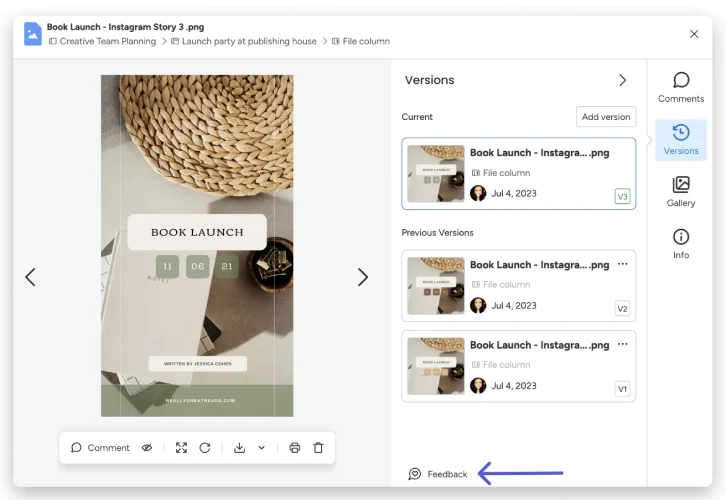
The monday.com file versioning feature places all file versions in a centralized place to keep your team aligned at all times. (Source: monday.com)
- Customizable forms: Create personalized forms using a no-code form builder for collecting, tracking, and analyzing data. Apply conditional logic for follow-up questions and set automated actions for directing requests to the concerned departments.
- File versioning: Save multiple file versions in one place and view other versions, from the most recent to the oldest. You can preview, download, and add annotations to each version.
- Dependencies: Establish connections between task items dependent on one another. Define the relationship between items and restructure your project timeline based on time changes.
ClickUp: Best for Globally Distributed Nonprofit Teams
*Get more savings by opting for annual prepayment and save up to 30%.
ClickUp lets you execute projects smoothly and fast-track teamwork with its all-in-one work solution for distributed nonprofit teams. You can create user groups for task assignments, watchers, and mentions in comment threads. Agile dashboards let you monitor backlogs, adjust timelines, and visualize the progress of projects remotely. You can also collaborate in real time with built-in chat, whiteboard, and documents with rich editing tools.
ClickUp enables seamless project execution and accelerates teamwork for dispersed nonprofit teams with its comprehensive work solution. You can create user groups for task assignments, watchers, and mentions in comment threads. Agile dashboards allow you to monitor backlogs, adjust timelines, and visualize project progress remotely. Additionally, you can collaborate in real time using built-in chat, whiteboard, and documents with rich editing tools.
Unfortunately, while ClickUp connects with Zapier and all plans come with 50 third-party integrations, some apps like Google Drive, Dropbox, and Tableau Web Connector unlock in higher plans. If you’re looking for a fully integrated project manager for nonprofit organizations, check out Wrike. It integrates with over 400 apps and has its own integration add-on, allowing you to automate entire workflows across your organization.
ClickUp Features
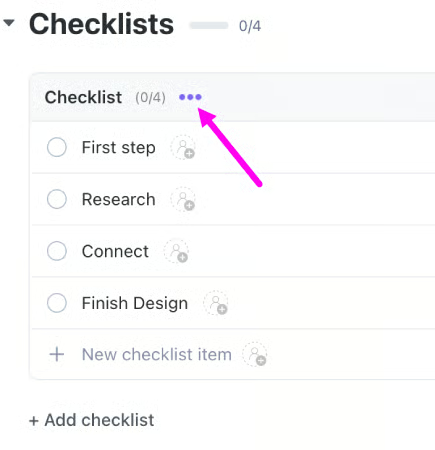
The ellipsis feature under the task checklist provides different edit options for your to-do list items. (Source: ClickUp)
- Custom statuses: Mark your tasks with custom, color-coded statuses, such as “in progress,” “editing,” or “pending,” so your team can easily view everyone’s progress.
- Task checklist: Use simple to-do lists to create a set of to-do items within a task. Organize your checklists using the drag-and-drop tool and reuse old checklists with templates.
- Screen recording: Instantly capture your desktop screen without time limits and send it to your team using a shareable link that can be viewed instantly in a browser. Use your microphone to add your voice to the recording so your team can understand the full context of the task.
Smartsheet: Best for Expense Tracking
Among the best free project management software for small businesses and nonprofits, we found that Smartsheet is excellent for those seeking spreadsheet functionality in their project management software. It’s ideal for nonprofits tracking budgets and resources and needing expense forecasting. Smartsheet consists of rows, columns, conditional formatting, and over 80 formulas. see trends and at-risk tasks with calculated values and calculate data across multiple sheets.
However, Smartsheet’s spreadsheet-inspired platform initially makes it difficult to use, especially for users who lack experience with spreadsheets. monday.com is a similar but much more user-friendly alternative, as it lets you work in grids but uses visual elements like colors and columns, giving you a more intuitive experience.
Smartsheet Features
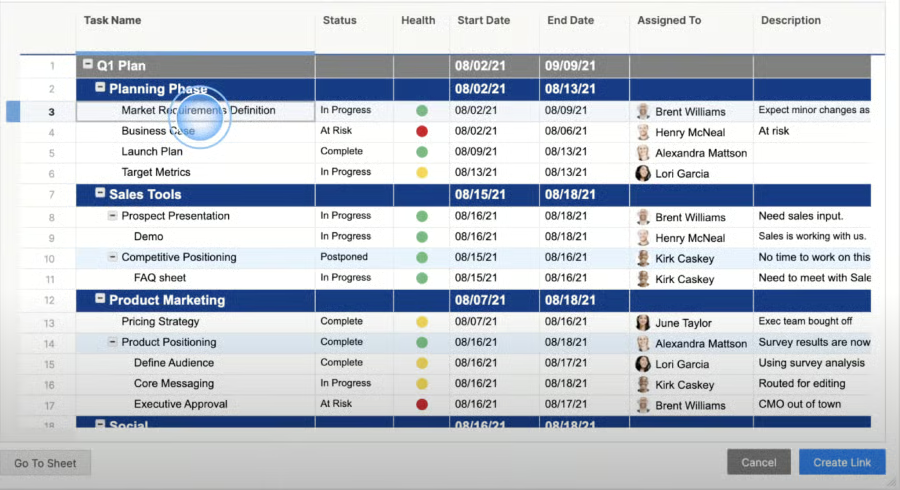
Smartsheet uses a spreadsheet program to create a collaborative environment. (Source: Smartsheet)
- Bridge: Smartsheet provides a cross-platform process automation engine that automates routine tasks and shares data across platforms. It uses a no-code interface to build advanced workflows and set up configurations between systems.
- Cell linking: Connect projects by sharing real-time information across sheets. Organize data from multiple sources with a summary sheet by pulling specific values from specific sheets into a read-only format.
- Data egress: Configure how your company restricts data-sharing activities to prevent the distribution of sensitive data. Prevent users from printing, sending, publishing, and exporting confidential files.
Wrike: Best for Complex Campaigns
Wrike excels at handling intricate projects for nonprofits, offering customizable work views and dynamic Gantt charts so everyone can see real-time project schedules and updates. Its top non-profit organization project management features include email integration to enhance team communication and productivity, and in-app file and video editing tools for creating professional materials without needing any advanced editing skills.
Despite Wrike’s powerful campaign planning tools, it’s not the most budget-friendly option because it lacks a monthly payment option. For small teams and nongovernment organizations (NGOs), we recommend a cheaper alternative like Freedcamp, with a monthly fee starting at only $2.49 per user. This provider doesn’t sacrifice affordability for capabilities because it offers all the collaboration tools you need to maximize productivity.
Wrike Features
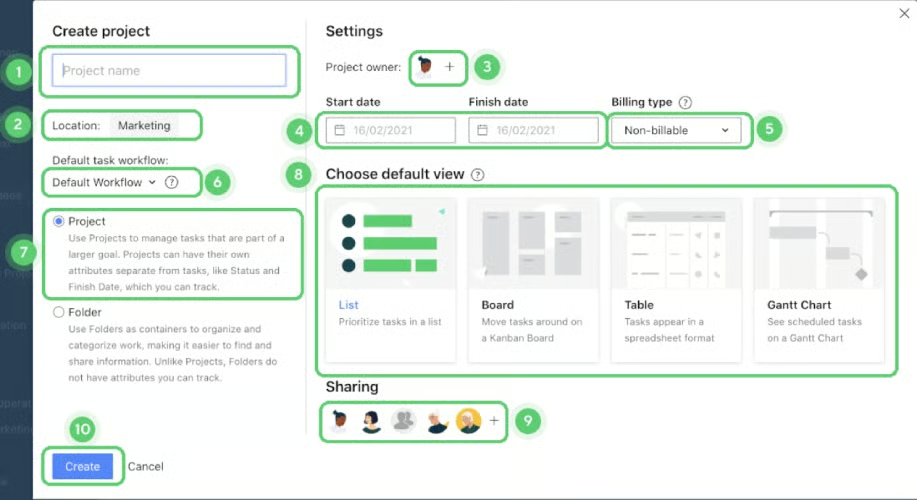
Subprojects are created in the same way as their parent projects. (Source: Wrike)
- Use case templates: Use a premade framework to perform a specific work type like projects, dashboards, tasks, reports, and request forms. Categories range from marketing, operations, creative, and Agile.
- Nested projects: A project that is part of a larger parent project with the same properties as projects. Add tasks, color code, set the status, and share with other users who can access the parent project.
- Spaces: These are top-level grouping types in Wrike’s folder hierarchy that store all the relevant information in your team. Use it to recreate your company’s structure and dedicate a private or public space.
Asana: Best for Fundraising Event Planning
*Asana offers annual and monthly billing and a 50% discount for eligible NGOs.
Asana works as an event planning software to manage fundraising tasks and details in one accessible place. Invite third-party vendors as guests to your project so that they can keep track of deliverables and get an overview of your deadlines. Proofing in Asana lets you add feedback on event assets (e.g., posters or invitations) and turn comments into actionable tasks. Use the fundraising event template to customize it for your organization’s needs.
Like Wrike, Asana’s expensive price tag can be difficult for small nonprofits operating on a limited budget. However, its steep learning curve can make optimizing the new platform challenging. If you’re after cost-savings and ease of use, try monday.com. It’s a completely visual project management platform with a monthly starting price of $12 per user.
Asana Features
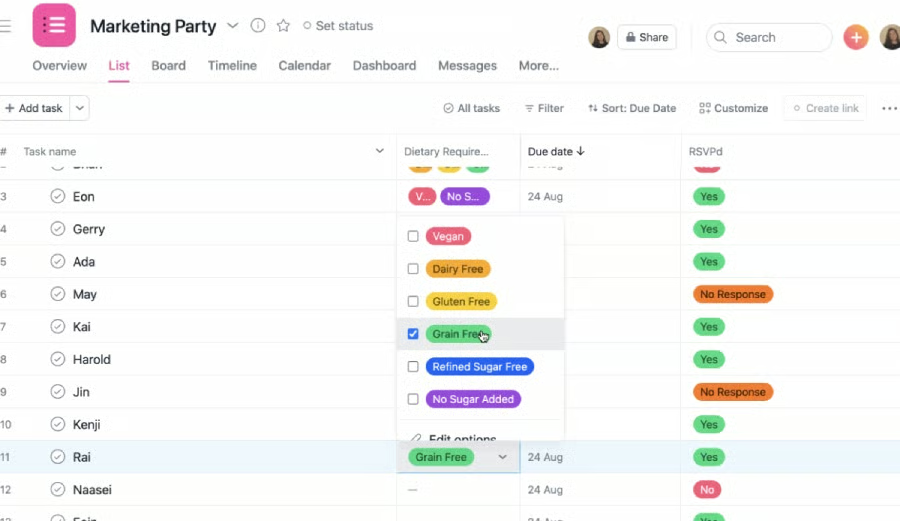
Use custom fields to include additional data to your tasks in your Asana projects. (Source: Asana)
- Custom fields: Add color-coded labels to tasks so you can organize, track, and sort data your way. Choose from various field types, such as dates, numbers, priorities, and texts.
- Project Brief: Use a text editor to outline the essential details of your project, like backstory and scope of work. It lives within the Project Overview tab and lets you attach any supporting file.
- Workflow builder: Create efficient workflows using a visual tool to automate processes, connect teams, and streamline projects in a single place. For instance, you can create rules to trigger specific actions like updating status, assigning tasks, and turning form submissions into functions.
Freedcamp: Best for Nonprofit Teams on a Budget
*Save 25% when you opt for annual billing.
Freedcamp is a valuable tool for small nonprofits looking for a low-cost project management solution that covers all the basic features without all the fancy features. All plans include unlimited projects, tasks, and storage. Its paid plans won’t break the bank because monthly fees start as low as $2.49 per user. It’s also one of the few providers offering several add-ons (e.g., invoicing and reports), so you don’t have to upgrade to higher tiers to access a certain feature.
Unfortunately, Freedcamp doesn’t have unique offerings that set it apart from competitors. In fact, this provider leaves behind a few primary features like Gantt charts and Kanban boards. If you’re looking for an affordable alternative that doesn’t skimp on features, check out ClickUp. Its robust free plan includes access to many advanced features like automation, dependencies, sprint management, and up to 13 project views.
Freedcamp Features
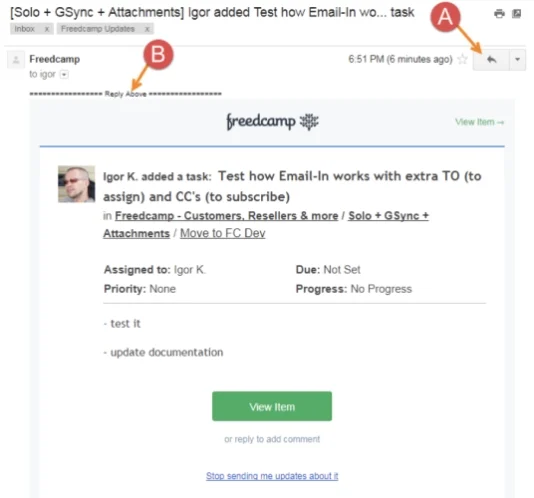
Freedcamp lets you assign tasks to your team by adding their Freedcamp email address to your email. (Source: Freedcamp)
- Discussions: Give your teams an organized space to brainstorm, ask questions, and discuss projects. You get clutter-free threaded conversations that are searchable, shareable, and attached to specific tasks.
- Password Manager: This tool provides your team with a secure way to share passwords and avoid poor password security habits. All saved passwords are encrypted and protected by a master password.
- Email-in: Create tasks, comments, and discussions using Freedcamp’s “email-in” functionality. This lets you manage your project without logging into your Freedcamp account.
How We Evaluated the Best Project Management Software for Nonprofits
We handpicked a variety of project management software for nonprofit organizations based on popularity, industry sentiments, and functionality ratings among users. Then, we designed a six-category rubric to evaluate and compare all the providers. After computing the final scores, we selected six providers that ranked the highest. Learn how we evaluated the best project management software for nonprofits by clicking on the tabs below:
We examined the subscription plans of all our top picks and gave points to those charging less than $15 for the base plan. We explored the feature inclusions of providers offering free project management tools for nonprofits as well as their paid plans (entry-level to enterprise tiers). We also gave more weight to those offering volume discounts, cheaper annual fees, and a lengthy free trial for the paid plans.
We looked for capabilities typically found in a project management app, including file storage, task reminders, document management, and a mobile app. We also checked if all plans support two-factor authentication to ensure account security.
Many providers offer industry-specific capabilities to support unique project management needs. We looked for specialized features like milestone tracking, advanced project views (e.g., Kanban, Gantt, and calendar), and expense management. We also reviewed the number of third-party integrations and automation tools available.
We assessed each software’s usability by testing it ourselves and analyzing customer reviews from reliable websites. We also reviewed the feedback of recent users and checked for learning curves during the setup and configuration phase.
We checked the customer service channels offered for each project management software, such as phone, live chat, email, and helpdesk. We gave higher points for 24/7 coverage.
We assessed each project management provider’s performance by examining its standout features and user-friendliness. We also considered their level of popularity and value for money.
Frequently Asked Questions (FAQs)
Project management software for nonprofits ensures effortless project planning and execution, including managing events, volunteers, donors, and fundraising campaigns. Nonprofit groups can work from anywhere and handle various tasks in a centralized location, from planning fundraisers and creating volunteer assignments to maintaining sponsors’ records.
Nonprofits should look for essential project management features in a tool, including project planning and scheduling tools, time tracking, team collaboration, budget management, and dashboards and reporting. These tools make visualizing work easier, tracking project progress, and ensuring constant and consistent communication between colleagues and stakeholders.
Utilizing appropriate project management software and systems enables NGOs and charitable institutions to optimize their impact, operate optimally, and maintain transparency in pursuit of their objectives. Given their often constrained resources, effective project management aids these organizations in allocating funds, time, and talent efficiently.
Bottom Line
Project management software for nonprofit organizations helps teams operate efficiently, enhancing the NGO’s reputation and attracting more support for long-term sustainability. In this guide, monday.com was ranked the top project management tool for nonprofits because of its customizable workflow and strong collaboration and integration capabilities. Thanks to its special pricing for nonprofits, it’s also a great financial choice for budget-strapped institutions.
If you want project management software for nonprofit organizations, sign up for monday.com’s free version or 14-day free trial to explore its unique capabilities.
